Kontera

Showing posts with label Weka. Show all posts

Friday, January 24, 2014

How to plot ROC Curves in weka?

Receiver Operating Characteristic (ROC) represents the different trade-off between false positives and false negatives. It is created by plotting the fraction of true positives out of the total actual positives (True Positive Rate) vs. the fraction of false positives out of the total actual negatives (False Positive Rate), at various threshold settings. 
 
Do the steps given here for classification, after that right click on the result list


Select Visualize threshold curve
 

X axis will be False Positive Rate and Y axis will be True Positive Rate
To save the image click  Alt + Shift + Left Mouse Button

Thursday, January 23, 2014

Classification using Weka - Weka Tutorial 1

This tutorial gives in depth idea of how the classification in data mining is done using the weka tool.
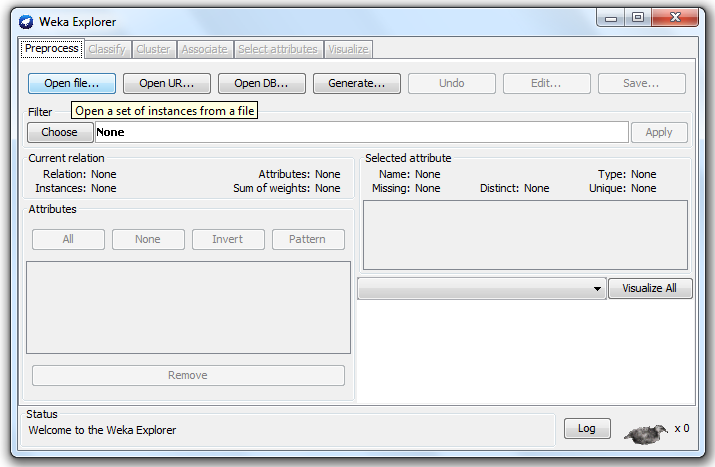
  1. Click the explorer tab in the weka (Figure 1)
    Figure 1
  2. under the Preprocess tab click open file (Figure  2)
    Figure 2
  3. Open an .arff file to do classification (Figure 3)
  4. Figure 3
    Click the classify tab, choose the classifier
    Figure 4
  5. Click the start button
    Figure 5
  6. The result will like the following.
    Figure 6